Everyone, all together.

The family app that remembers what everyone forgets: checkups, passports, homework and dinner. With an assistant your family names.

A family runs on a hundred loose ends.

Appointments, forms, school things, dinner: they live in group chats, paper notes and somebody's head.

One look. Everyone's day.

See who's where, and who's in for dinner, in one look.

It speaks up before you forget.

Overdue checkups, expiring passports, homework due tomorrow. Tutti tells you first, every morning.

Tutti means everyone.

Italian for ‘all’. At home, dinner with everyone there.

Comes with Tutti

Meet , your family's personal assistant.

Tap the name to change it. Every family names their own.

It lives in your family chat. Ask Yona what's on, or to add something, and it confirms in one line everyone can see.

Family chat

You, Sam, Yara, Noah · Yona

  1. Sam

    Can someone grab milk on the way home?

  2. You

    On it 👍

  3. You

    add dentist for Yara next Thursday

  4. Yona

    New appointment · Yara

    • Dental checkup
    • Thu Oct 1 · 4:00 PM
    • Recurring every 6 months · last visit overdue
    View in calendar
  5. Sam

    is Noah's passport still valid?

  6. Yona

    Noah's passport expires 14 March. I'll flag it 45 days ahead.

The demo family's chat. Tap something to say and watch it land.

Tap something to say

Get your own Yona

A day with Yona

  1. 7:00

    Morning brief: the weather, what's on, and anything overdue.

  2. Any time

    Ask or add anything. Done in one line, for everyone to see.

  3. 21:00

    Tomorrow at a glance, and a nudge if dinner isn't planned.

  4. Sunday 18:00

    The week ahead, day by day, for everyone.

What Tutti remembers for you

Kept in one place, and brought up before they're due.

  • Checkups

    Dentist, eyes and jabs for everyone. Flagged when overdue.

    Overdue

  • Passports and IDs

    Passports, Emirates IDs, visas, licences and insurance. Flagged 45 days before they expire.

    45 days ahead

  • Food at home

    Tells you three days before anything in the fridge goes off.

    3 days ahead

  • Homework

    What's due, for whom and when. Shows up two days before.

    Due in 2 days

  • Shopping list

    One list the whole family adds to. Updates for everyone instantly.

    Shared

  • Who's in for dinner

    Everyone taps in or out, so you cook for the right number.

  • Reminders

    Anything else worth a nudge, from a school form to a birthday present.

A look inside

Real screens from the beta, with a demo family.
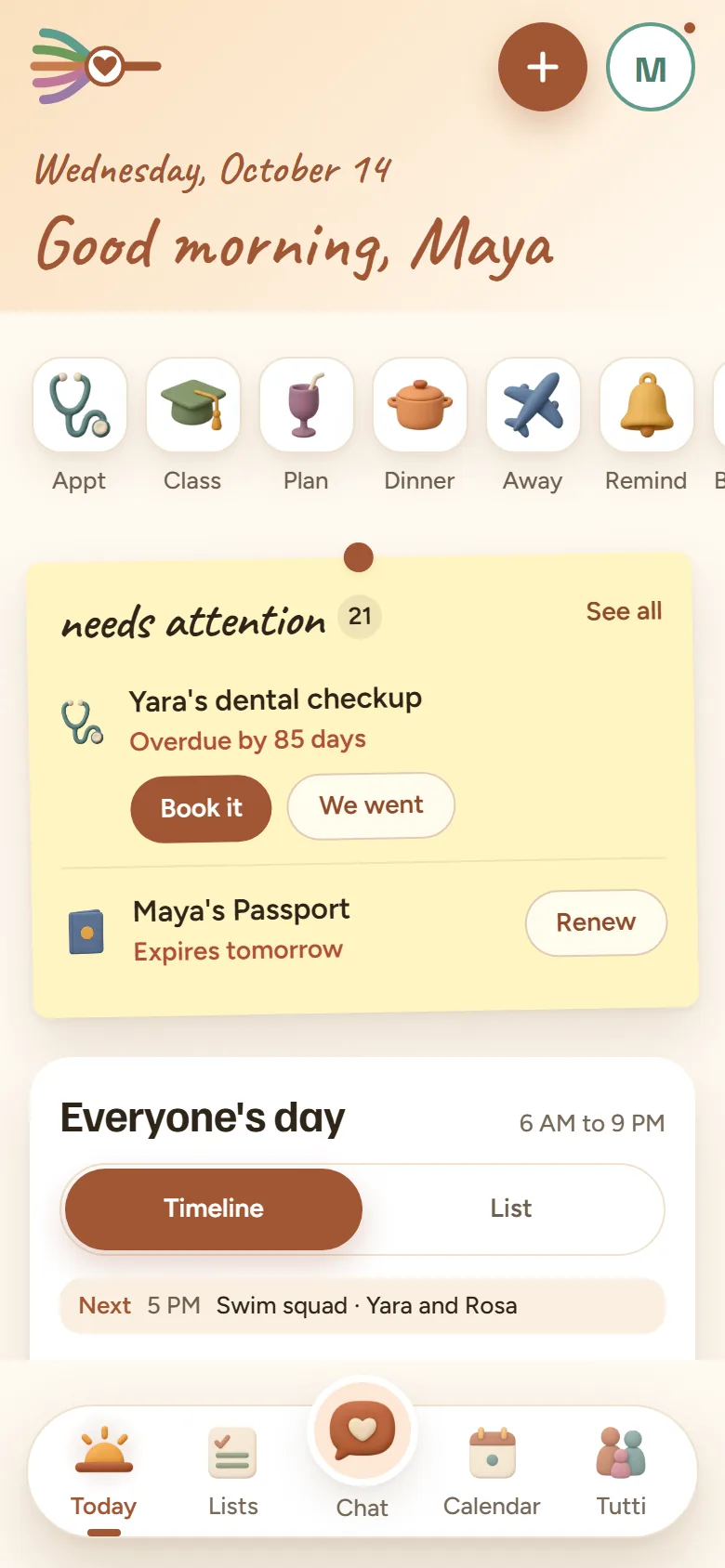
  1. Tutti's Today screen greeting Maya. Below it, quick adds for an appointment, a class, a plan, dinner, time away and a reminder. A needs attention note counts 21 things, led by Yara's dental checkup, 85 days overdue, with Book it and We went buttons, and Maya's passport, which expires tomorrow, with Renew. Underneath, everyone's day from 6am to 9pm, and next up, Yara's swim squad at 5pm with Rosa.
    Today What needs attention, quick adds for the usual things, and everyone's day below it.
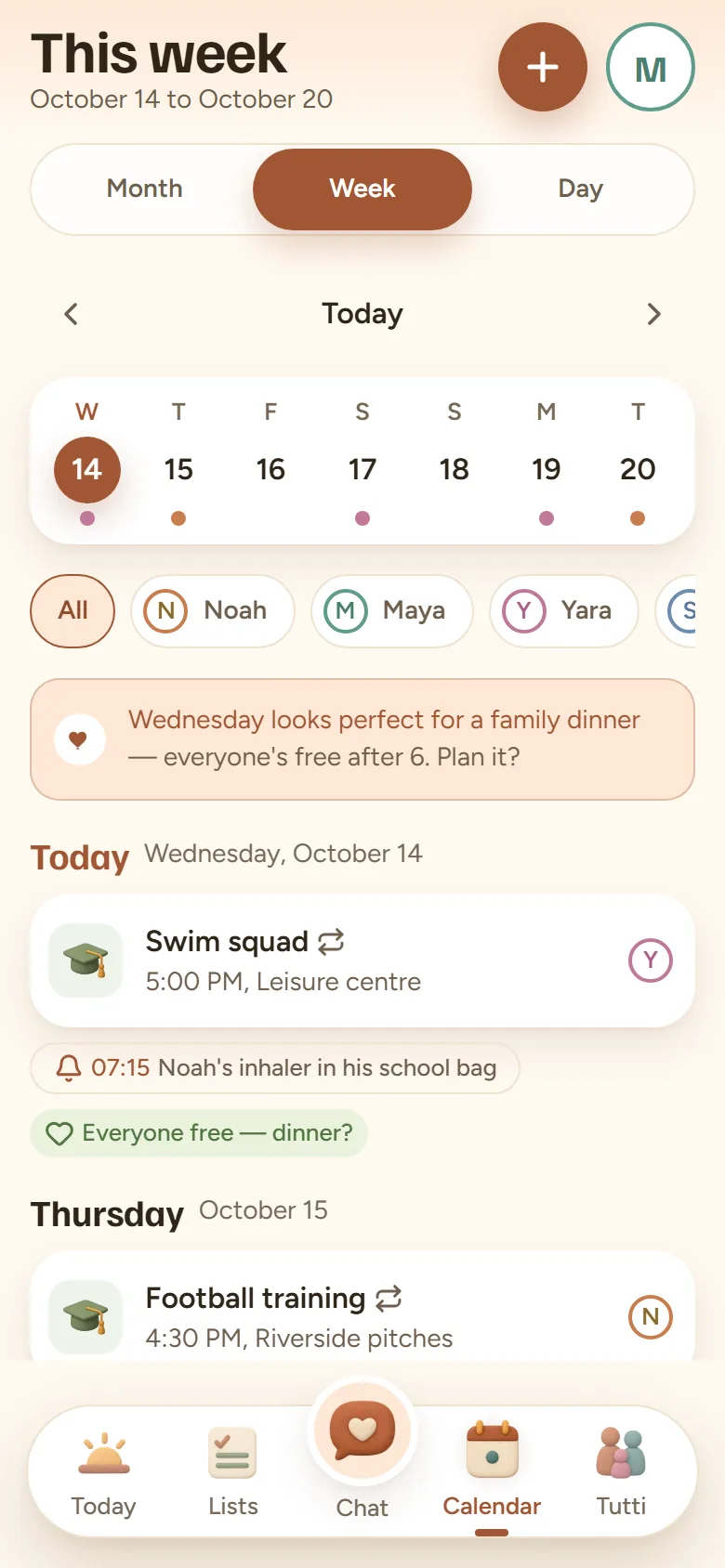
  2. Tutti's calendar for the week of 14 to 20 October, with a filter for each person. A note says Wednesday looks perfect for a family dinner, as everyone's free after 6. Today has Yara's swim squad at 5pm at the leisure centre and a 7:15 reminder to put Noah's inhaler in his school bag; Thursday has Noah's football training at 4:30pm.
    Calendar The week for everyone or one person at a time, with a free evening picked out for dinner.
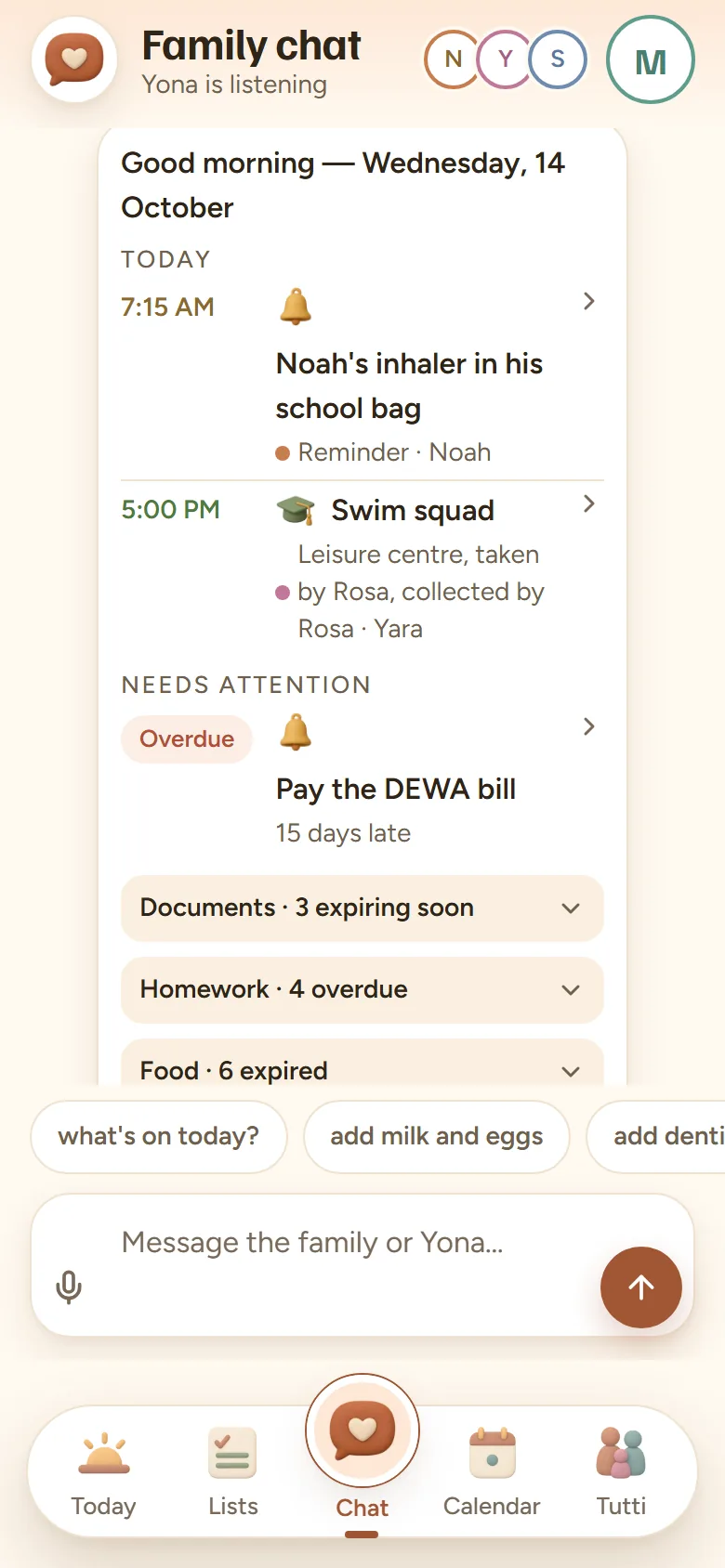
  3. The assistant's morning brief in the family chat for Wednesday 14 October: a 7:15 reminder for Noah's inhaler, Yara's swim squad at 5pm with Rosa taking and collecting her, the DEWA bill 15 days overdue, and folded lists of three documents expiring soon, four overdue homework tasks and six foods past their date.
    The brief Each morning in the family chat: what's on today, and what's overdue or expiring.
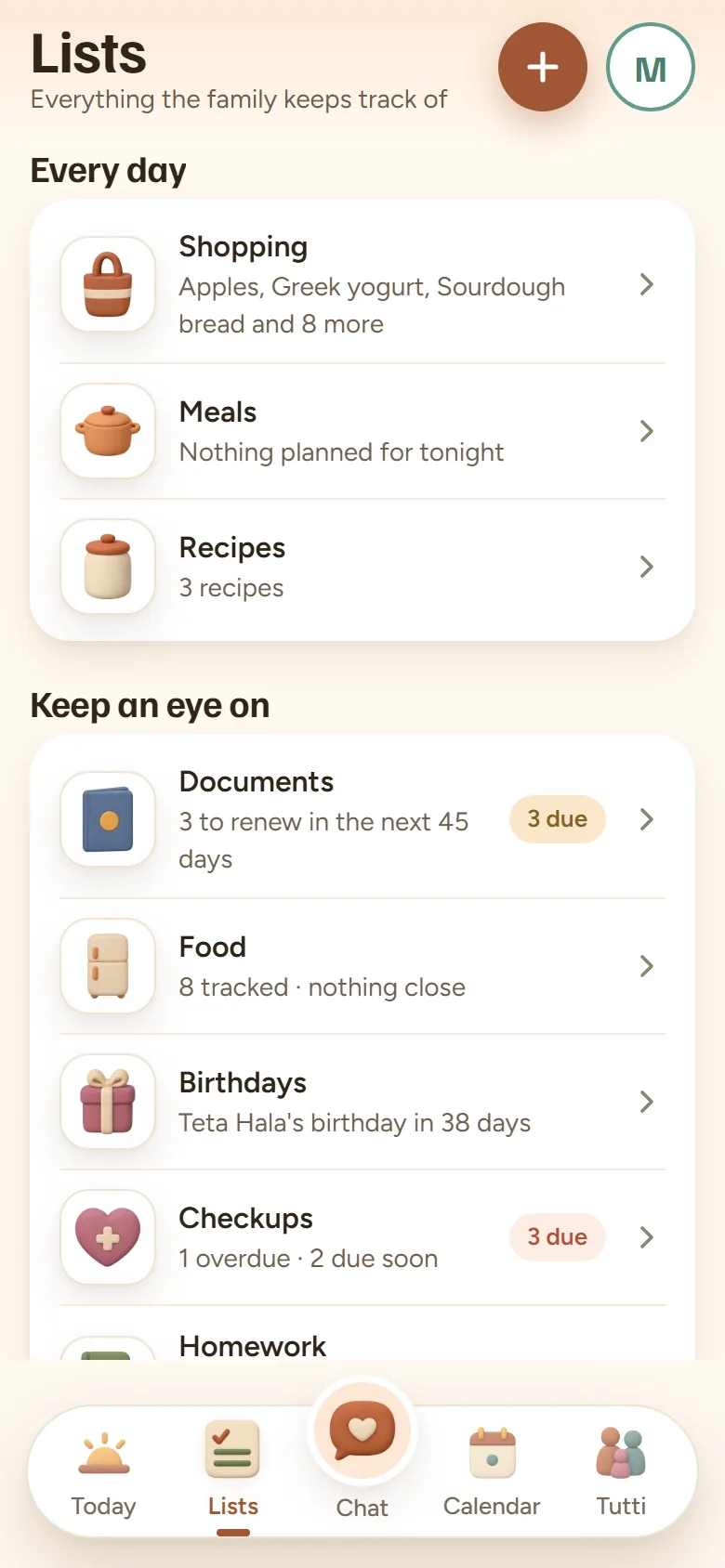
  4. Tutti's Lists screen. Every day: the shopping list (apples, Greek yogurt, sourdough bread and 8 more), meals with nothing planned for tonight, and 3 recipes. Keep an eye on: 3 documents to renew in the next 45 days, 8 foods tracked and none close to going off, Teta Hala's birthday in 38 days, and checkups, 1 overdue and 2 due soon.
    Lists Shopping, meals and recipes, then everything to keep an eye on.
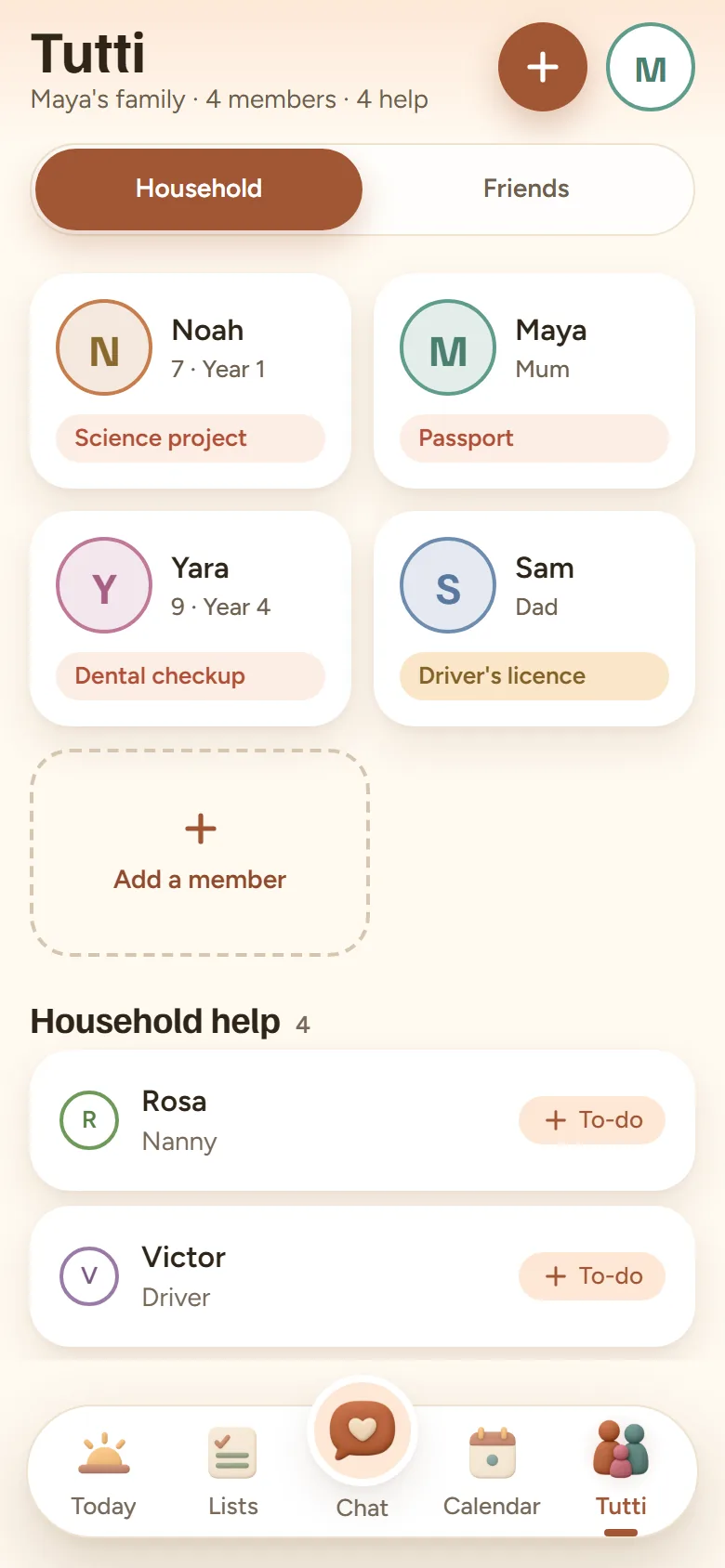
  5. Maya's family in Tutti: Noah, Maya, Yara and Sam, each flagged with what needs them (a science project, a passport, a dental checkup, a driver's licence), a tile to add a member, and household help including Rosa, the nanny, and Victor, the driver, each with a button to give them a to-do.
    Family The household at a glance: what's up with each person, and the household help.
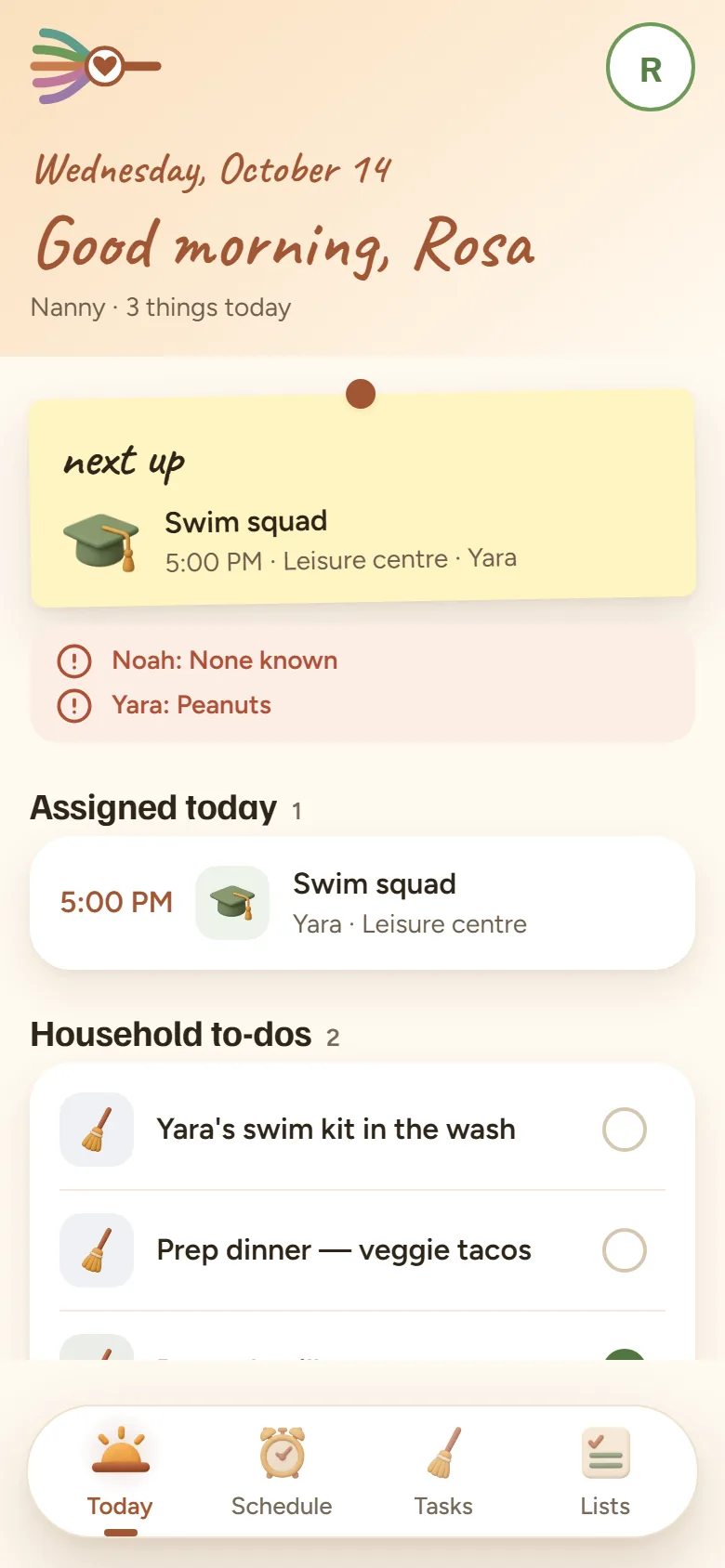
What Rosa, the nanny, sees in Tutti: three things today, next up Yara's swim squad at 5pm at the leisure centre, the children's allergies (Yara: peanuts), the swim squad as the one run assigned to her, and the household to-dos, starting with Yara's swim kit in the wash and dinner prep.
What Rosa, the nanny, sees.

Room for the whole household

Everyone gets the view they need, and nobody sees more than they should.

  • Add and change anything, and invite the rest with a code.

  • Their own row on Today, with homework and checkups.

  • They join as family, so Sunday lunch is on everyone's calendar.

  • A nanny, driver or housekeeper sees only what you share, never the family chat.

  • Each entry is for everyone, just you, or shared with staff.

  • No tracking either, and you can delete your account in the app any time.

Why “Tutti”?

Tutti is when everyone plays.

In an orchestra, tutti is the moment everyone plays together.

No one's in yet. Tap a name, or the heart for everyone at once.

How it works

  1. Create your family.

    And name your assistant while you're at it.

  2. Invite everyone with a code.

    They paste it and they're in. Codes last 7 days.

  3. Add what matters.

    From then on, Tutti reminds you before things are due.

Now bring your family in.

Tutti is in private beta. Leave your email and we'll invite you when there's room.

We use your email only to tell you about Tutti. Privacy policy

Questions

Can my children use it?
Children 13 and up get their own login, once you confirm their age. Younger ones still show on Today, without a login.
Who can talk to the assistant?
Everyone in the family chat. It only uses what's shared with the family, never anyone's private items.
Does it sync with Google or Apple calendars?
Not yet. Tutti keeps its own family calendar, and sync is on the list.
Which phones?
Android and iPhone. The beta is invite only: leave your email above.